Tags
Tags are the most common property types for creating annotations. There are two different types: - simple tags: they allow assigning a single, unique tag to an image - multi-tags: they allow assigning as many tags as desired to an image
Hierarchical Tags
In some cases, it can be useful to create several annotations simultaneously. For example, if I want to annotate my image with the term "Mona Lisa" and later I want to group all my images that are paintings, it can be useful to create a "painting" tag and add the "Mona Lisa" tag as a "child" to it. An image tagged with "Mona Lisa" will thus be tagged as both "Mona Lisa" and "painting."
It is possible to create hierarchical links between tags by clicking on the button below:
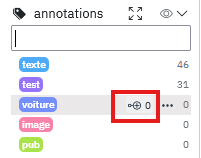
Then simply choose an existing tag or create a new one in the field that appears to add a "child" tag.
## Multi "parents"
It is possible to create complex hierarchical links. A parent can have several children, but it is also possible for a child to have several parents.
This allows assigning different categories in a single step. If we take the previous example, "Mona Lisa" could also have the "woman" tag as a parent. Assigning the "Mona Lisa" tag would then also assign "painting" and "woman."
Tag management can become a bit complex if there are many tags and multiple hierarchical links. Therefore, there is a dedicated window for more finely managing tags and associated images.