Choosing Your Model
For more advanced uses, it is possible to compare image vectorization models. The one used by default by Panoptic's similarity plugin is OpenAI's CLIP model (when they were still Open). But there are other models that will offer a different vectorial representation and that can be more or less effective depending on the datasets. Some of them are directly integrated into the similarity plugin:
- Mobilenet: model with average performance but much lighter in terms of computation, good for use on a machine with low CPU power, does not allow text/image similarity.
- CLIP: Panoptic's default model, good performance and runs relatively fast on most machines, allows text/image similarity.
- SIGLIP: heavier model than CLIP, but achieving better performance in text/image similarity, vectors will take much longer to compute on an average machine.
- DINOSv2: heavier model than CLIP, supposed to have better performance on visual similarity, does not allow text/image similarity.
Creating New Vectors
In order to test these different models, you need to generate the vectors associated with that model, so go to the project settings:
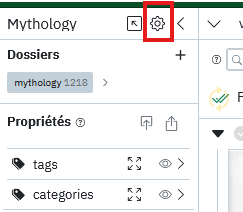
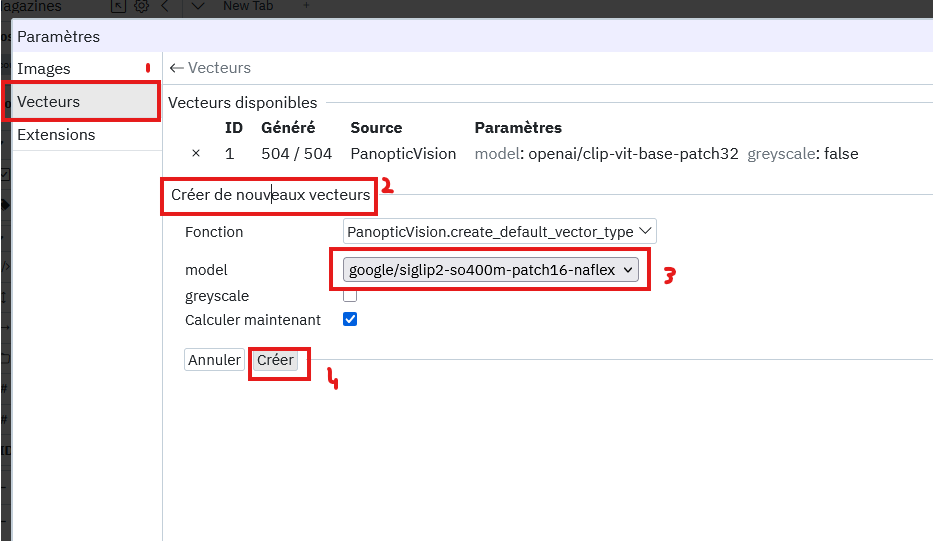
- Then go to Vectors > Create new vectors.
- Choose the name of the model you want to use, in the example below SIGLIP.
- Confirm by pressing Create and the calculation should start in a few seconds.
Note
It is also possible to check the "greyscale" option before pressing "Create" if you wish to ignore the color of the images. This can be useful, for example, in a corpus containing black and white images and others in color, if you do not want color to be a determining criterion for what is represented in the image.
Note
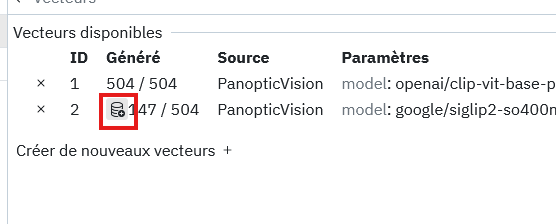
If for any reason the vector calculation is interrupted, it can be restarted by pressing the following button:
Using Vectors
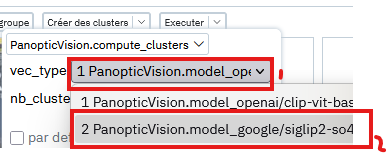
Once generated, the new vectors are not used by default. As other vectors (CLIP for example) remain available, you must choose which vectors you want to use when executing an action.
Thus, in any Panoptic similarity action, clustering, visual similarity, textual similarity, group recommendation, it is always possible to specify which vectors to use:
- When executing a function, click on vec_type and choose the vectors you have just generated: